Screens 5: VNC Remote Desktop is, as the name suggests, an application that allows you to share screens remotely between devices. You can use it, for example, to access your work MacBook on your iPhone, iPad, another Mac, or Vision Pro. It’s a primarily work-focused app that you’d expect to focus on productivity rather than flashy features.
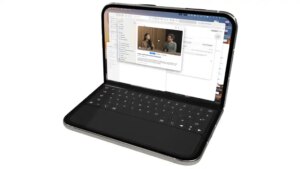
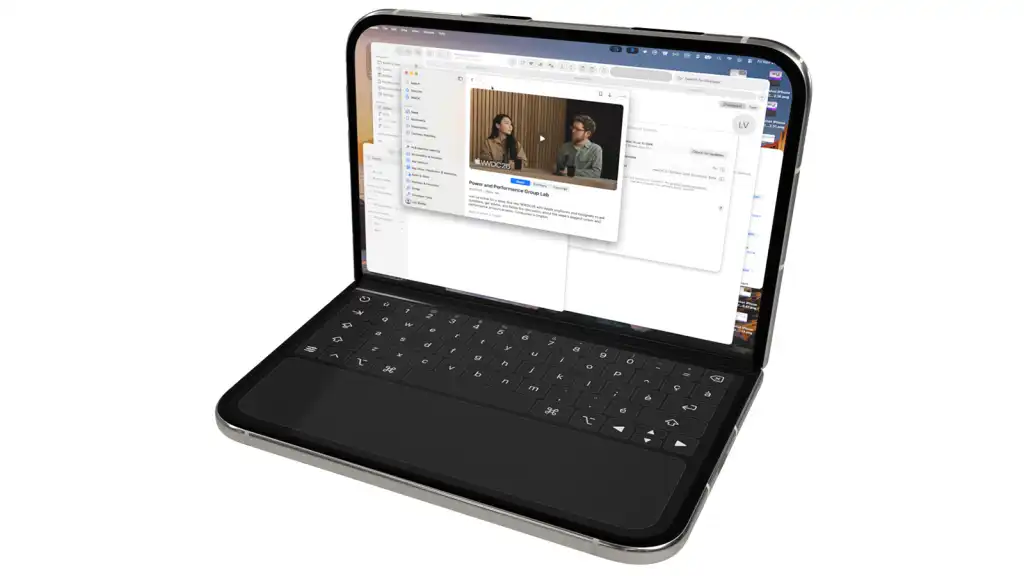
But with the version 5.10.6 update, which was released for iPhone on November 25 (manufacturer Edovia says the equivalent update for the Mac version is awaiting approval from the App Store), something quite fun was added: portable mode for iPhone Duo. When you use this mode on a semi-folded Duo and connect it to a MacBook, the shared output is displayed in a way that mimics the layout of a laptop. “Simply fold your iPhone Duo in half to turn it into a pocket-sized workstation, with your remote desktop on the top half and a custom keyboard and trackpad below,” Edovia explains in a blog post.
It’s absolutely adorable. And functional too. “The trackpad supports the same familiar gestures you’ve come to expect from screens,” adds Edovia, “while the custom keyboard supports multiple languages, follows the selected system keyboard language, and lets you swipe down the keys to access secondary characters, just like on the iPad.”
Screens is officially a free app, but it has virtually zero functionality without a subscription. If you want to try out the new mode and turn your iPhone Duo into a small laptop, you can start a trial subscription, but (assuming you don’t find the app useful enough to decide to use it long term) remember to cancel it before you’re charged. It’s a nice feature, but on its own it’s probably not worth $4.99 a month.