iOS version history: each iOS and the features it brings
There are important milestones scattered across the iOS timeline:
Apple
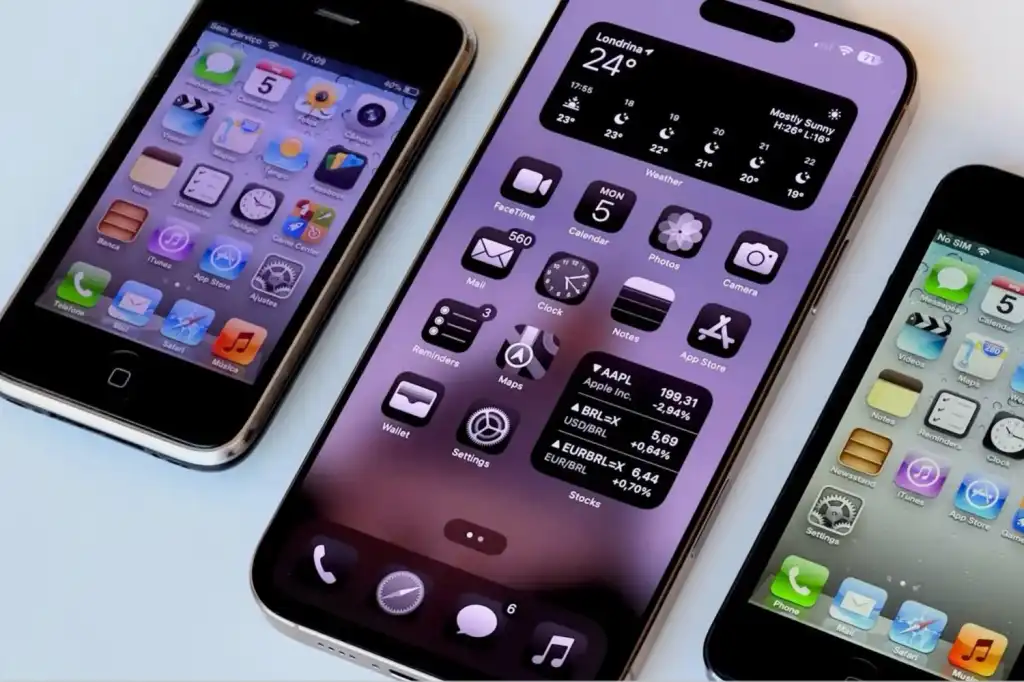
iPhone operating system (2007): iOS made its debut in 2007 with the first iPhone. However, when Steve Jobs picked up the little device and revealed it to the world for the first time, it was not running iOS 1. Instead, Apple reported that it ran OS
iPhone 2 operating system (2008): The second major version of the iPhone software was innovative because it brought third-party applications and introduced the App Store.
iPhone 3 operating system (2009): This update was designed to make it easier to find things while also adding the ability to have up to 11 pages on your home screen. Messages could support MMS, video recording became possible, and it was possible to save voice memos with the Voice Memos app.
iOS 4 (2010): Apple rebranded iOS and added the ability to put apps in folders for a better-organized home screen with iOS 4. FaceTime, iBooks, and Game Center apps also arrived. The iPad also entered the scene, sharing the same operating system as the iPhone.
iOS 5 (2011): iOS 5 was introduced alongside the iPhone 4S in 2011, which debuted Siri as an integrated part of the operating system. Notification Center was introduced and iCloud arrived bringing synchronization between devices. This was the first time that iOS could be installed directly on the iPhone without the need for a computer.
iOS 6 (2012): This is where Apple Maps came into the picture. The Podcasts and Passbook (now Wallet) applications also arrived. iCloud Photo Stream made it easier to share photos with family and friends. iOS 6 was the last one with a skeuomorphic design.
iOS 7 (2013): With iOS 7, iPhone users got a redesigned user interface, which looked much more modern with flatter icons. iOS 7 introduced AirDrop and CarPlay.
Apple
iOS 8 (2014): One of the features of iOS 8 was Continuity, which linked the iPhone, iPad and Mac, so that tasks could be “transferred” from one device to another. Family Sharing is also here to make it easier to manage a child’s iPhone.
iOS 9 (2015): iOS 9 improved the Notes app, added Apple News, and introduced a new Night Shift mode that removed some of the blue light that can disrupt circadian rhythms and prevent someone from sleeping.
iOS 10 (2016): There were updates to Messages and changes to the Photos app in iOS 10. A new Home app brought HomeKit control. The maps received a redesign. The Universal Clipboard meant that users could copy something on a Mac and paste it on an iPhone, for example.
iOS 11 (2017): Things changed significantly in iOS 11 in 2017, as it brought the first touch and gesture interface, allowing the first iPhone without a Home button: the iPhone
iOS 12 (2018): Screen Time, Memoji, Group FaceTime, and Siri Shortcuts were new in iOS 12.
iOS 13 (2019): Another major change came with iOS 13 in 2019, when Apple’s mobile operating system for the iPad was separated from the iPhone, with iPadOS powering the new iPads. iOS updates included dark mode, new privacy features, and the ability to sign in with Apple and hide your email address. The Photos and Apple Maps apps were redesigned and a keyboard for typing was added.
iOS 14 (2020): One of the most notable additions was Back Tap, a feature that effectively turned the back of the iPhone into an extra button. Home screen widgets and the app library were also important new additions. Starting with iOS 14.2, music recognition was integrated directly into the operating system via a Shazam button.
Foundry
iOS 15 (2021): Focus mode arrived in iOS 15 to help users manage the flood of notifications, Live Text and Visual Look up made it possible to interact with text within photos (Live Text) and use the camera to identify objects such as plants and animals. The Safari browser received a major interface update as did Maps and the Weather app. Read: iOS 15 vs iOS 14.
iOS 16 (2022): One of the most visible changes in iOS 16 was the complete overhaul of the lock screen, allowing users to add widgets for the first time to view data at a glance without unlocking their devices. Apple added Rapid Security Responses so it can deliver important security patches outside of an iOS update. Read: iOS 16 vs iOS 15.
iOS 17 (2023): NameDrop in iOS 17 made it possible to share information by bringing two iPhones together. Stolen Device Protection added a layer of security by requiring biometric authentication (Face ID or Touch ID) before you can change your Apple ID password. Live Voicemail meant that iPhone users could get a live transcription of a message. Read: iOS 17 vs iOS 16.
iOS 18 (2024): The iOS 18 update laid the groundwork for Apple’s subsequent AI initiatives. There was also a complete redesign of the Photos app, a dedicated Passwords app, and Control Center Personalization. Read: iOS 18 vs iOS 17.
iOS 26 (2025): Instead of moving forward to iOS 19, Apple aligned the numbering of all its operating systems by year with iOS 26. It wasn’t just a name change, though, there was a major visual and functional overhaul with a Liquid Glass design language. There were also big changes to the Phone app with Call Screening and Hold Assist. Live Translations makes it easy to communicate with foreign friends and colleagues. The Camera app had a simplified redesign and a Games app that integrated Game Center features. Here’s how iOS 26 and iOS 18 compare.
iOS 27 (2026): iOS 27 was released in September 2026, including a massive overhaul of Siri, better Apple Intelligence integration, improved photography and camera tools, and improvements to parental controls. Here’s how iOS 26 and iOS 27 compare.
Foundry