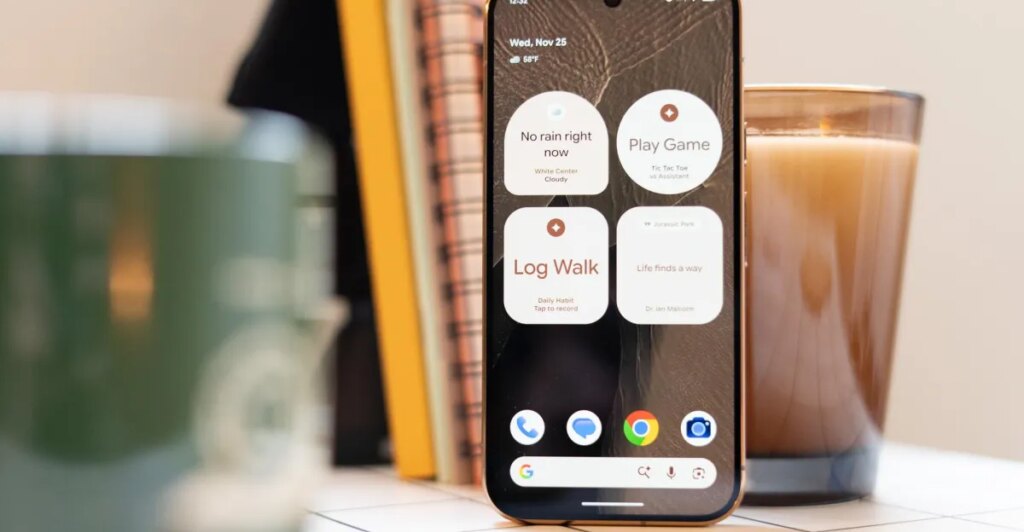
What I need is a widget. It needs to tell me real-time arrivals at the bus stop near my house. Tapping my phone screen to open the correct app and select my stop will slow me down enough to miss a bus. I need visible information and I was hoping Android’s vibration coded widget feature could help me. To my disappointment, it doesn’t, but I still had a good time preparing other widgets.
Google announced the ability to create custom widgets using AI at I/O in the spring. It’s called Create My Widget and it’s part of Android’s “Gemini Intelligence” feature set. It’s in beta and just started rolling out to Pixel phones earlier this month. I was excited. This feature not only raises tantalizing questions like “What is an app?” and “Where is the app located?” – things we live for here in The dot com edge – has potential to help me make my home screen ridiculous.
I fired it up on a Pixel 11 Pro and prepared my first widgets, including one that shows a different quote from Jurassic Park every hour – the original movie, not any of the sequels, naturally. It took about 20 seconds to do it and that’s it. Tapping the widget opens a thread on r/MovieQuotes, so there’s clearly not much software magic going on under the hood. But did it give me any real joy to read the words “That’s a big pile of shit” on my home screen? He did it.
I also made a widget that will display the words “Tut tut, it looks like rain” whenever it is raining. This is nonsense and does nothing except make me happy. I couldn’t think of anything clever it should say when it’s not raining, so otherwise it just says “It’s not raining right now.” But I live in Seattle, so I’ll get a lot out of this widget.
The interface for creating a widget suggests a few ideas and categories, leaning on more practical uses like habit trackers and recipe inspiration. Okay, I’ll try something normal, I thought. I’m trying to improve my daily mental health walk, so I had him create a widget to log a week’s worth of walks. I was hoping for something visual that would trick my little monkey brain into keeping the streak going. Instead, I got something simply labeled “Walk Log” that has Gemini add a walk to my calendar when I tap it. At least Gemini suggested the extra step of creating a checklist where I could check off the days of the week as I completed my little walk.
It took me a minute to figure it out, but many of the widgets are basically little shortcuts for Gemini. You tap one, it opens the Gemini interface on your home screen, thinks for a moment, and then comes up with what you were asking for. The types of widgets you can create also seem to fit into some well-defined templates. You can create a widget that displays a countdown to a certain holiday or event on your calendar. It can display a recent score and time of the next game of your favorite sports team. For something more open-ended, your widget will pull Google search results (for example, suggest a different three-ingredient cocktail recipe every day) or ask Gemini to discover it for you. I was hoping to have applets that I could customize to my liking, but this is more of a one-size-fits-all feature. Fair, I guess.
I was hoping to have applets that I could customize to my liking, but this is more of a one-size-fits-all feature.
That’s why my bus schedule widget didn’t work. I asked for a real-time arrival list; gave me a tile that says “Bus Arrivals” and uses Gemini to look up arrival times for the stop I specified. Gemini is useful for some things but useless for this; gives me a detailed answer about how often the bus runs and when I can expect it to arrive based on the schedule. It’s not what I had in mind. On the positive side, my Jurassic Park The quote widget had some wise words for me: “Life, uh, finds a way.” That will do for now.