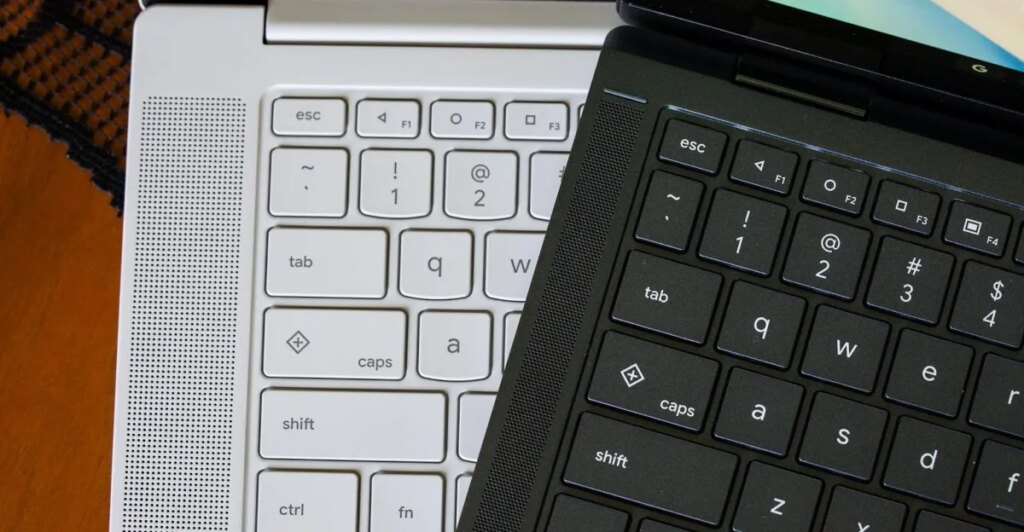
A common mistake I’ve seen with Googlebooks is that the quick insert and Google logo keys are new. They are not, as they first debuted a couple of years ago on some Chromebooks. But there’s something new for Googlebooks that was lifted directly from Android phones around 2014.
On all Googlebook keyboards, the F1, F2, and F3 keys are the old triangle, circle, and square navigation icons that first debuted in Android 5.0 Lollipop. These were the back, home, and app switching buttons long before everything moved to gesture-based navigation, and they’re still built into Android 17 phones as an alternative. On Googlebook OS, these keys do what you expect: the left-pointing triangle goes back, the circle goes “home” minimizing all open apps, and the square shows your open apps like Mission Control on macOS / Task View on Windows.
It’s helpful to have these buttons and have them match across all Google Books. The back button sometimes seems necessary when using Android apps that aren’t really optimized for a desktop interface or mouse controls. I just wish that a second press of the home button would put all your apps back where they were, but that’s another feature called desktop view that uses a different keyboard shortcut.
If you’re an old Android nerd, it’s fun to see these buttons live. But they’re also a reminder that sometimes you need a backup when Android has everything Android with you.